
Trials are where a lot of your revenue is decided. Someone installs, they get a few weeks to make up their mind, and then they either start paying or they disappear. That moment is worth watching closely.
Until now, watching it meant visiting three different pages. We have brought them together into a single Trials page, and added something the old reports never had: a view of what is about to happen.
What you had before
Three separate reports, each answering one question:
- Active Trials – how many merchants were on trial each day.
- Converted Trials – how many trials turned into paying subscriptions.
- Cancelled Trials – how many were abandoned.
Each was useful on its own. The problem was that answering an ordinary question meant opening all three and comparing them by eye. “Did we have a good week?” is really a question about conversions and cancellations and how many trials were running at the time – three tabs, three charts, and some mental arithmetic.
These three reports are still there, marked Legacy in the menu. Nothing has been taken away, and the documentation for them is unchanged.
What the new Trials page gives you
Everything about trials on one screen, in four parts.
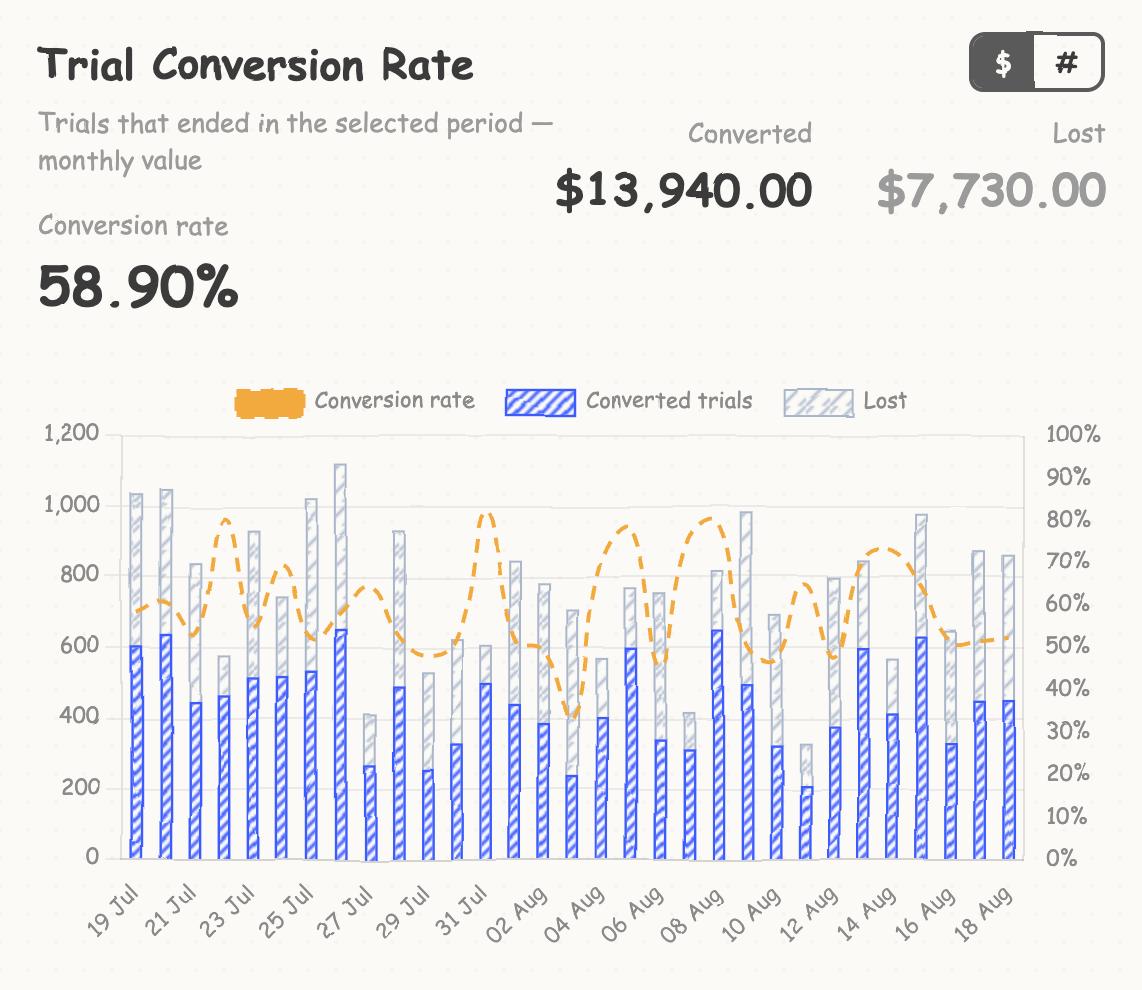
Trial Conversion Rate
How trials that have already finished turned out. Converted against lost, day by day, with the conversion rate drawn over the top.
The rate is the share of merchants who converted, not the share of the money. One expensive plan converting will not flatter the number.
Switch between $ and # to see either the money at stake or the number of merchants.
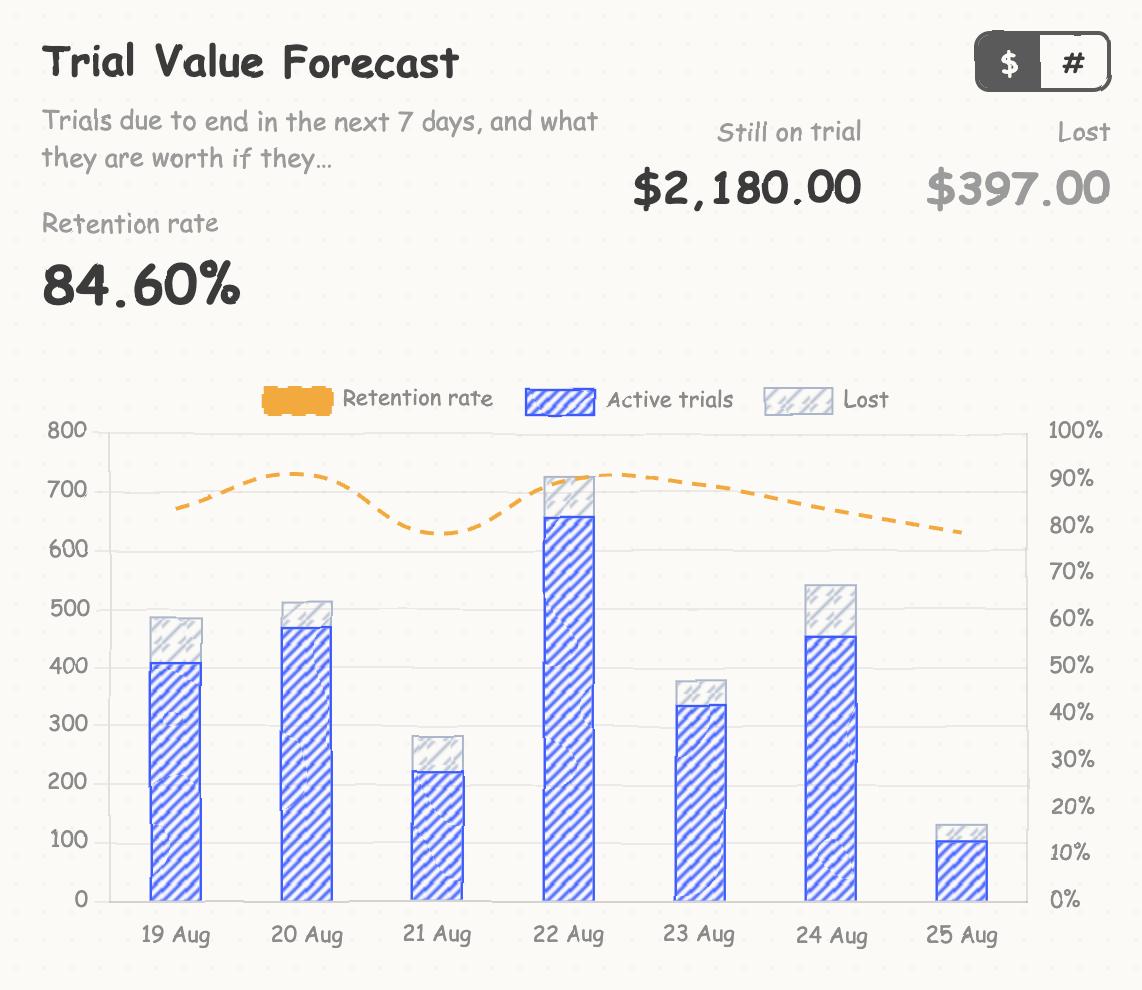
Trial Value Forecast
The part that did not exist before: trials due to end over the next seven days, and what they are worth if they convert.
This is the difference between reporting and planning. Instead of finding out on Friday that a good week just ended, you can see on Monday what is in play – and which merchants are worth a nudge before their trial runs out.
This card always looks at the coming week, whatever date range you have selected on the rest of the page. A forecast only means anything looking forwards.
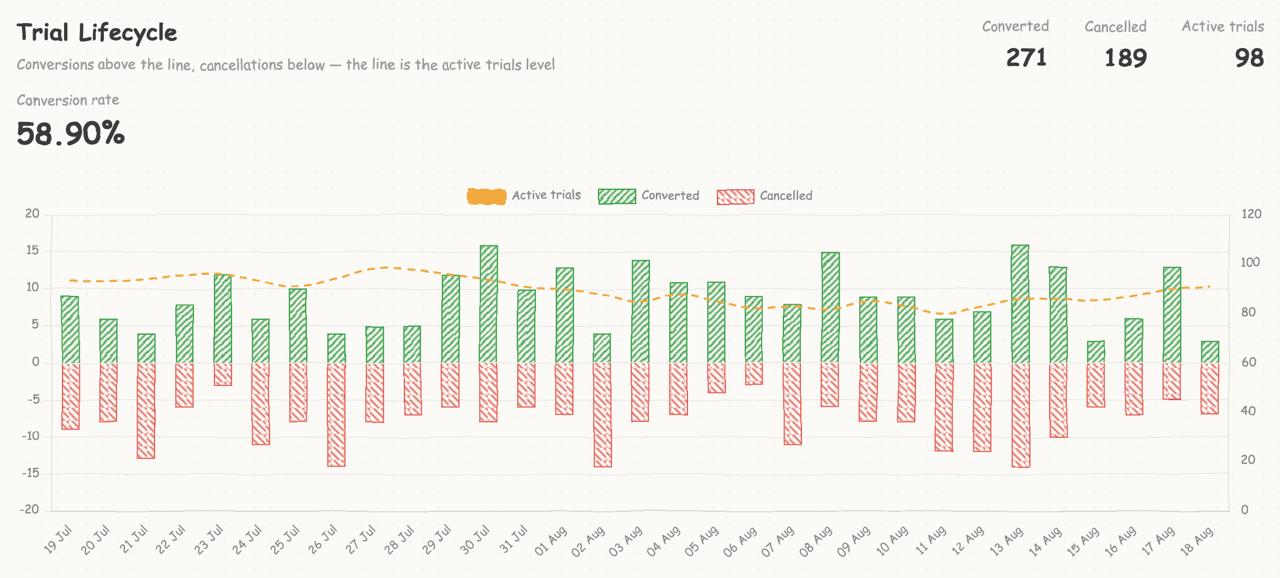
Trial Lifecycle
The chart that replaces the three old ones. Conversions are drawn above the line and cancellations below it, because they are opposite outcomes of the same day, and the line running across shows how many trials were active at the time.
One chart, one glance, no tab switching.
Trial Insights
Underneath the charts, the merchants themselves – every trial that started in the selected range, with the plan they are on and where they got to. Filter by plan, or narrow it to just the trials still running or just the ones that were cancelled.
Charts tell you the shape. This tells you who to email.
How trials are worked out
This is the part worth understanding, because it is where the new page is genuinely more careful than the old reports.
A trial is recorded from what Shopify actually did, not from your plan settings. When a merchant’s charge is activated, Shopify tells us the date it will take the first payment. If that date is a trial period away, the merchant is on trial, and that is when the trial ends.
That distinction matters when a merchant changes plan mid-trial. Shopify closes the old charge and opens a new one, and what happens next depends on the situation:
- Upgrading or downgrading during a trial carries the remaining trial onto the new plan. The trial continues, and the new charge is counted as the one still running.
- Changing plan in the middle of a paid billing period grants no new trial at all – the merchant keeps the time they have already paid for. Reading the plan’s trial length alone would invent a trial here and count a paying customer as a new one. The new page does not.
Every trial is valued at its plan’s monthly price, so an annual plan counts at a twelfth of its yearly price. That keeps monthly and annual plans comparable in one total. Values are gross – Shopify’s revenue share is not deducted, because it varies by merchant.
The numbers may not match the legacy reports exactly
They are close, but they are not always identical, and that is deliberate rather than a mistake.
The Legacy reports and the new page can disagree about how a particular trial ended – most often when a charge was frozen or declined partway through, or when a merchant changed plan mid-trial. The new page reads those cases from Shopify’s own record of what happened to the charge.
Where they agree closely is on how many trials are running, which is usually the number people check first.
If you have been quoting a conversion rate from the Legacy reports, expect the new page to give a slightly different figure. Pick one and stick with it rather than averaging them – they are answering the same question with different definitions of a lost trial.
One thing to check first
Trials are only recorded for plans that have a trial length set. If you have added a plan recently and not set its trial length, its trials will be missing from every one of these reports.
You can set trial durations under Settings → Trial Configuration, and the Trials page will warn you when it spots a plan that looks like it is running trials without one configured.
The new Trials page is live now under Growth → Trials. The three Legacy reports remain where they were for as long as you need them.